Pay-As-You-Go Tratta Sign, Campaign Detail Redesigned, and Reminders That Follow Rescheduled Payments
✍️ Tratta Sign, Now Pay As You Go
Tratta Sign no longer needs a subscription tier. Any organization can send a document for signature ad hoc and pay a flat cost per signed document, with pay-as-you-go documents shown as their own line on the invoice. If you already hold a Tratta Sign tier, nothing changes: you stay billed under that tier only, never both.
Why this matters for debt collection:
- Signature volume arrives in bursts: settlement agreements, hardship letters, and payment authorizations are episodic per client and arrive unevenly across a large book. The blocker was never the signature, it was committing to a tier sized for a volume that is uneven by nature.
- Same document either way: pay-as-you-go documents carry the same Certificate of Completion and audit trail as tiered ones.
- Costs you can see: per-document charges sit on their own invoice line, so you can tie signing spend back to the accounts that generated it.
📊 Campaign Detail, Redesigned
Campaign detail has a new design in Console, and it now covers SMS as well as email. Items in the SMS campaign list are clickable and open the same detail view, so both channels report the same way.
- Email and SMS in one view: SMS campaigns now get the same detail view and the same reporting as email.
- Filter by date range or run: narrow campaign data to any window, or to a single run. Clicking a run in the Runs list opens the detail with that run already filtered.
- Preview the template: see exactly what goes out, for pre-defined templates and custom ones alike.
- Send a test: send yourself a test email or SMS before a campaign reaches consumers.
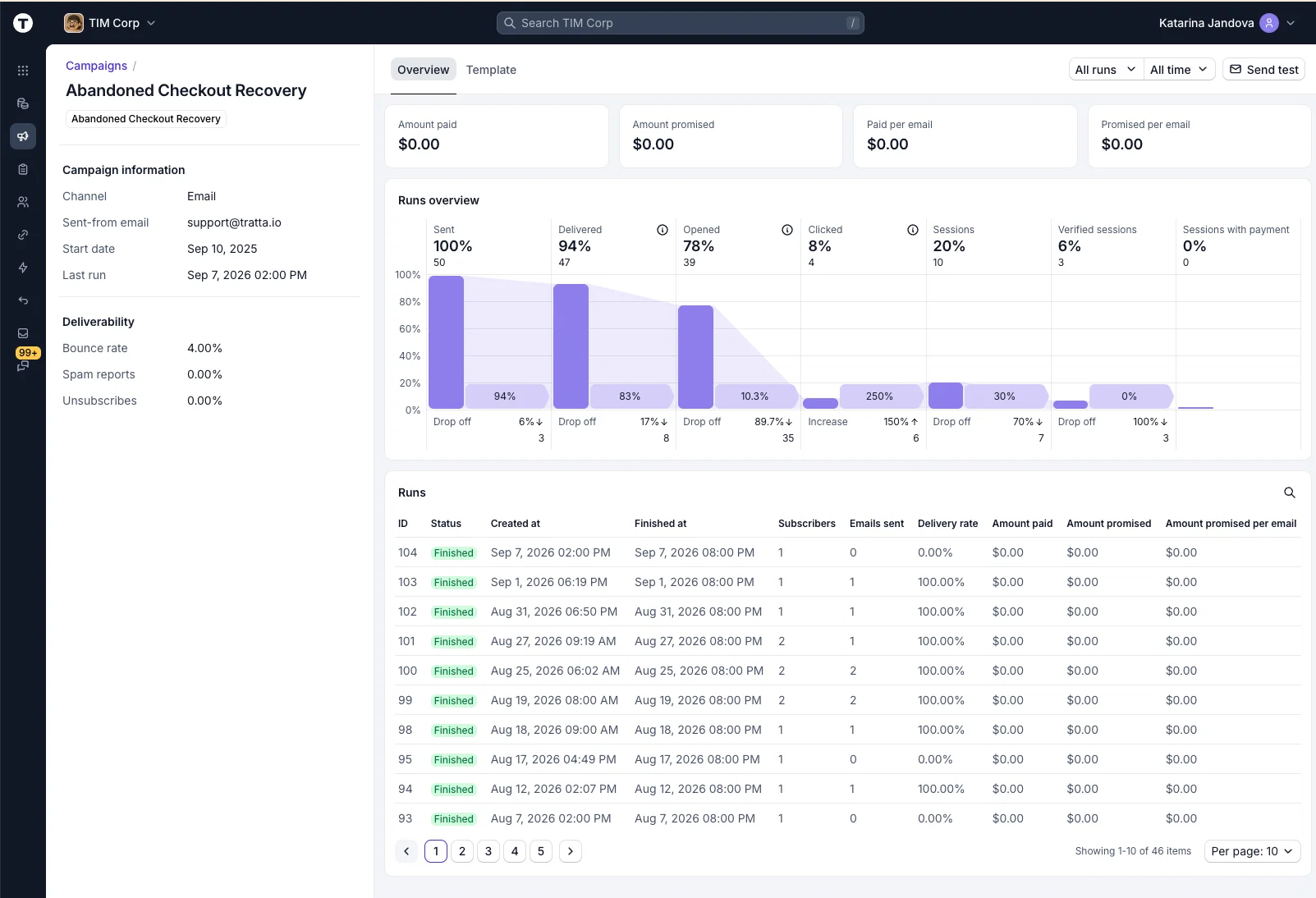
Send yourself a test SMS, not just a test email, and read the message a consumer would get before the campaign runs.
🔔 Payment Reminders Follow Rescheduled Payments
When a scheduled payment moves to a new date or amount, the earlier reminder is invalidated and a fresh one goes out ahead of the updated date, on your configured notice period.
Why this matters for debt collection:
- The notice period survives the change: a rescheduled payment no longer means a consumer holds a reminder for a date that has moved, or gets no reminder at all.
- Agents can reschedule without a workaround: an agent can move a payment for a consumer and the required notice still lands on time, automatically.
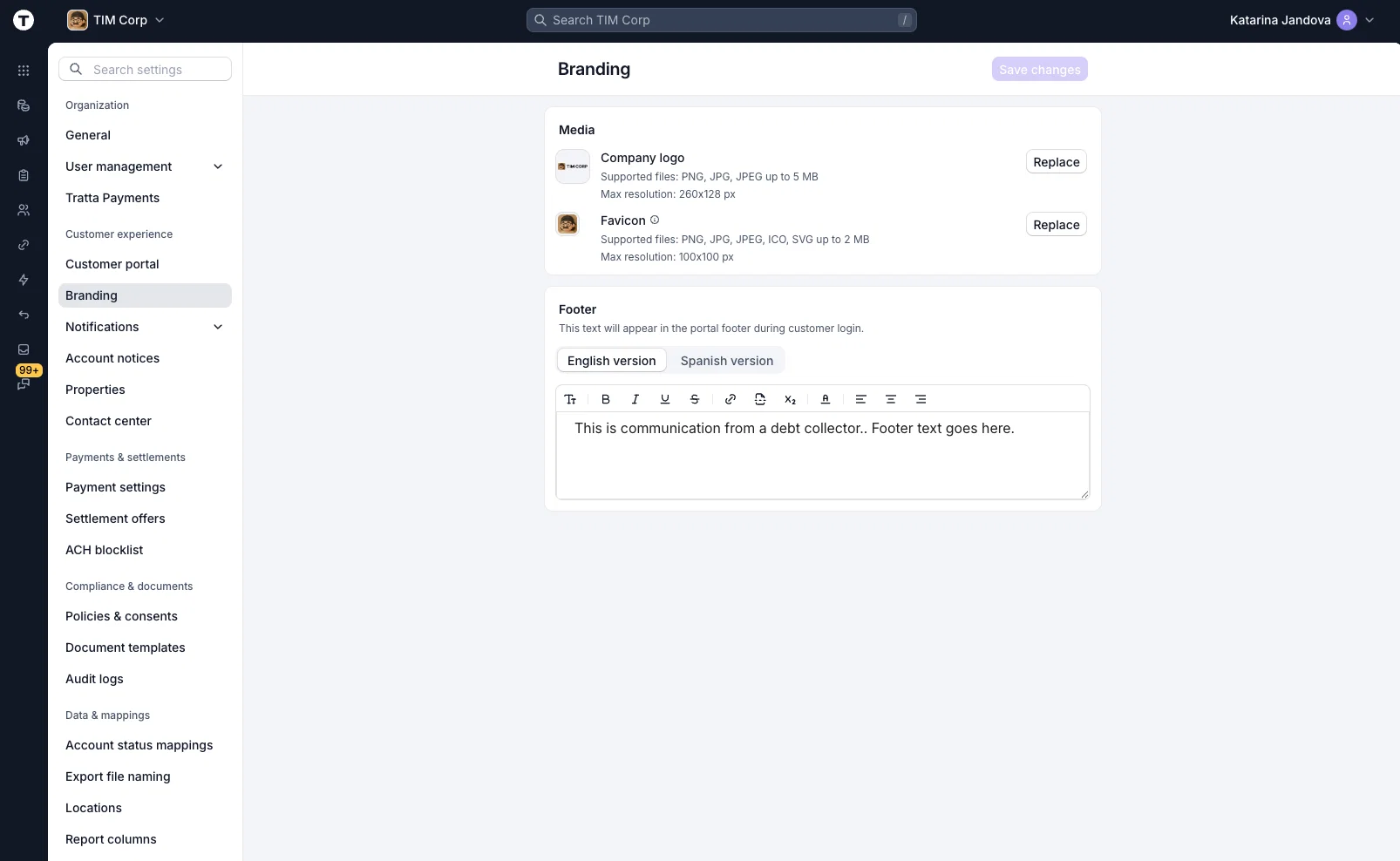
⚙️ Console Settings, Redesigned
The Console redesign continues through Settings. Notifications, Account notices, Properties, Tratta Payments, and Branding all move to the new design, matching the layout, navigation, and controls already in place across the rest of Console.
🛠️ Minor Updates
- Open Any List Row in a New Tab: Cmd+click on Mac, or Ctrl+click on Windows, opens any row in a Console list in a new tab. Work an account, a transaction, or a campaign without losing the list you were reading, and queue up several at once.
- Account security in Console: changing a Console user's email now requires the current password, and the address does not change until a confirmation link sent to the new address is opened, with a security notice going to the old one. Password rules are shown upfront, masked fields have a reveal toggle, and the account security page now shows when a password was last changed and how many recovery codes are outstanding.
- Guest dispute webhooks: disputes submitted by guests now fire a webhook the same way verified disputes already did, so an integration no longer misses that event class.
- Folder path on SFTP export targets: Reports now shows the folder path on each SFTP export target, so several targets on one server are no longer indistinguishable labels.
- Multiple billing invoice recipients: billing invoice emails now accept a comma-separated list of addresses.
- Batch ACH from your own FTP: Tratta can now pull Batch ACH import and campaign files from a client-hosted FTP server. Contact support to set this up.
- Signed document exports over SFTP: signed Tratta Sign documents already export nightly, and we can now issue an SFTP credential scoped to that folder so your team can collect them. Contact support to set this up.
- IVR follows your partial-payment rule: IVR payments now honor the organization's configured partial-payment setting, so IVR behaves the same way the rest of the platform does.
🔧 Maintenance, Bug Fixes, and Improvements
- Portal timestamps in your organization's timezone: consumer portal timestamps rendered in UTC, so a ticket opened late in the evening could appear to a consumer as the small hours of the next day. They now show in the organization timezone.
- Clearer permissions on customer details: a user without Notifications View saw an empty emails section that read as "no emails" rather than "not visible to you." The permission requirement is now shown.
- Ongoing technical updates and bug fixes to keep things fast, stable, and reliable.
Every item above is live now. Nothing to enable, and nothing to schedule.
If you want any of these walked through for your team, reach out to your Tratta contact. More updates are on the way. You can see the full list anytime at https://whatsnew.tratta.io/announcements 💫